
How to Set Up OpenSEO with DataforSEO API on Your Local Machine (Full Guide)

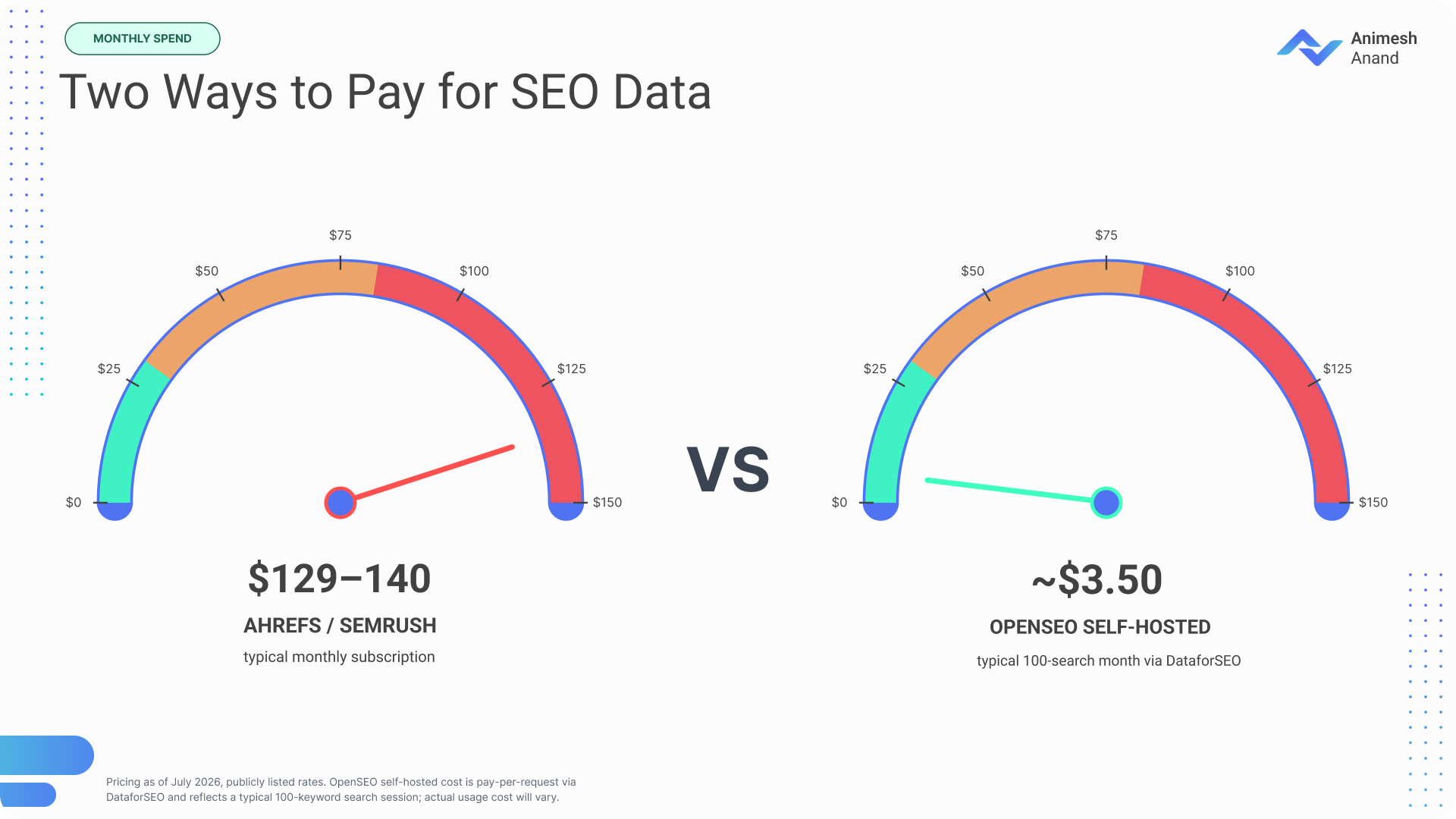
I canceled my Ahrefs subscription four months ago and I have not looked back once. Not because Ahrefs is bad, it’s genuinely grea, but because I was paying $129 a month for a tool I opened maybe two or three times a week. Do the math on that. That’s basically $1,500+ a year for something collecting dust most days.

Here’s the thing nobody tells you when you’re starting out as a freelancer or running a scrappy little agency: DataforSEO, the data provider that powers a huge chunk of the SEO software companies, and agencies, has been sitting there this whole time, letting anyone plug into the same data these other expensive platforms are built on. The catch? It’s API-only. No dashboard, no clicking around, just raw JSON responses that only make sense if you know how to code.

That’s exactly the gap OpenSEO fills. It’s a free, open-source interface that sits on top of DataforSEO and turns “I need to write a curl command” into “I click a button and see my keywords.” 

And in this guide, I’m walking you through the entire setup. From zero to running your first real keyword research, in about 20 minutes, no coding required.

Why Most SEO Professionals Are Overpaying for Data They Could Own

Let’s talk about the subscription trap for a second, because I think most of us don’t actually sit down and add it up.

Ahrefs Lite runs about $129/month. Semrush Pro is $139.95/month. That’s $1,300 to $1,500 a year, minimum, before you even touch a higher tier. If you’re a solo freelancer or a small two-person agency, that’s not “a business expense you barely notice”, and that’s real money, especially if you’re only logging in a couple times a week to check rankings or pull a keyword list.

And when you cancel, everything goes with it. Your saved keyword lists, your historical rank data, your reports, all gone!

Meanwhile, DataforSEO has existed this entire time as a pay-as-you-go API. Anyone with basic dev skills could build whatever they wanted on top of it. But “basic dev skills” cuts out most SEOs, marketers, and founders who just want to see keyword volume without writing a script.

So here’s the question this whole guide is answering: what if you could get DataforSEO’s data, the same stuff feeding a lot of premium tools, through a clean, modern interface, installed on your own laptop, for a tiny fraction of the cost? 

That’s the whole pitch of OpenSEO, and it actually delivers.

What Is OpenSEO (And How Does It Connect to DataforSEO)?

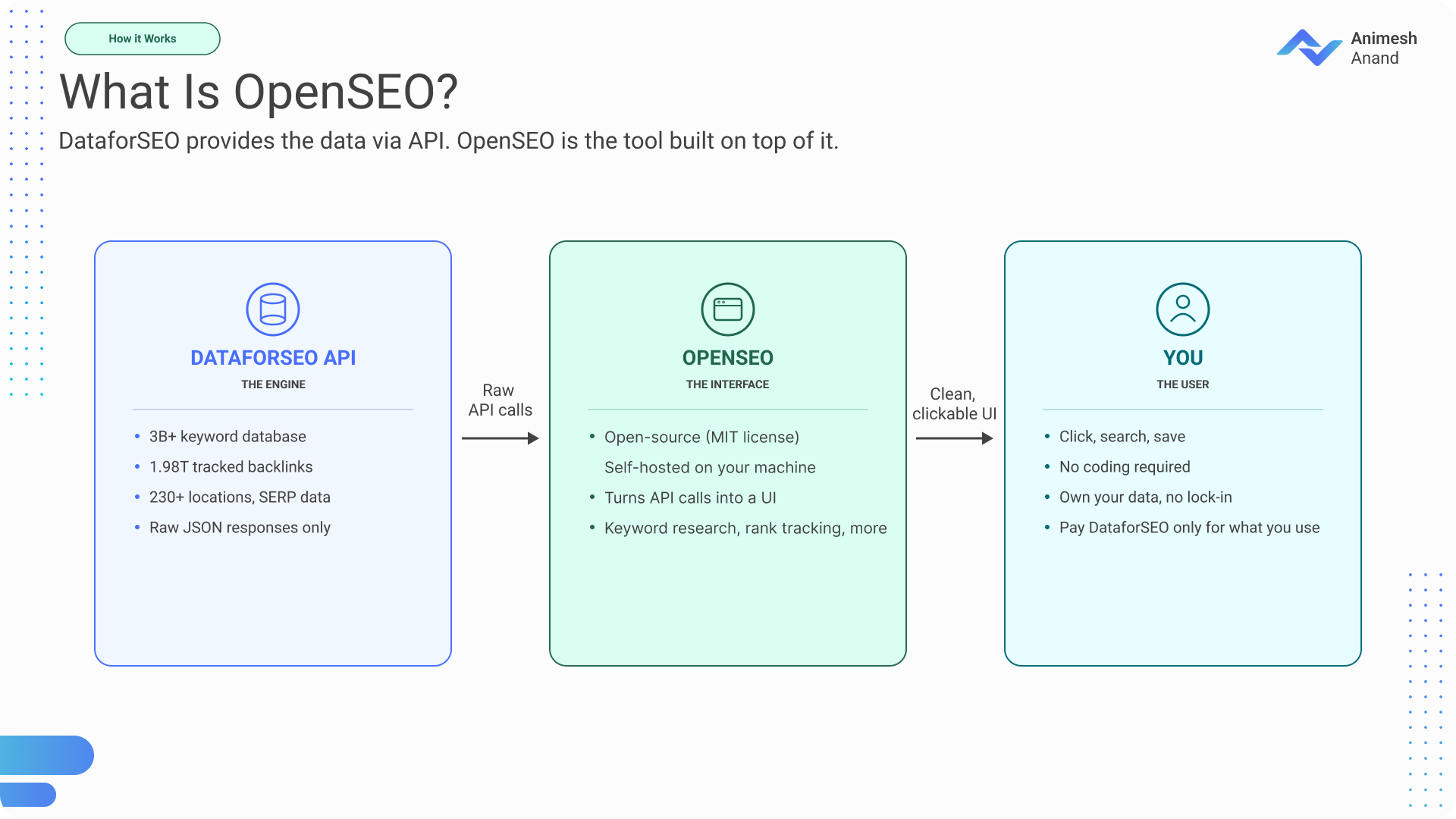
Quick way to think about it: DataforSEO is the engine. OpenSEO is the steering wheel.

OpenSEO is an open-source SEO platform (MIT-licensed, and it’s already crossed 7,000+ stars on GitHub as of July 2026) built by Ben Senescu at Every App, Inc. It’s essentially a direct response to bloated, overpriced SEO suites and the idea being: why should you pay a monthly fee for a UI, when the underlying data is already available separately, cheaply, on demand?

Important distinction: OpenSEO is not a data provider. It doesn’t have its own keyword database or backlink index. It’s a workflow and interface layer that talks to DataforSEO’s APIs behind the scenes. All the actual data: the 3B+ keyword database, the 1.98 trillion tracked backlinks, SERP results across 230+ locations, comes straight from DataforSEO.

The model here is what’s usually called BYOK (Bring Your Own Key). You sign up for DataforSEO separately, grab an API key, plug it into OpenSEO, and from that point on you’re paying DataforSEO directly, per request, for whatever you actually use. OpenSEO itself costs nothing when you self-host it.

What that unlocks: keyword research, saved keyword lists, rank tracking, domain overviews, backlink analysis, site audits, AI visibility tracking (whether your brand shows up in ChatGPT or Google AI Overviews), and a prompt explorer. All in one clean interface, running locally on your machine.

What You’ll Need Before Starting (Prerequisites)

Keeping this part short on purpose, it’s genuinely not a long list:

  • Docker Desktop installed. Grab it here. Free for personal use.
  • A DataforSEO account. Register here. It is free, no credit card required, and you get $1 in free credit right out of the gate.
  • About 15–20 minutes.
  • Optional: a Google account, if you want to hook up Google Search Console later.
  • Zero coding knowledge required. If you can copy a command, paste it into a terminal, and click a button, you can absolutely do this.

That’s it. No dev environment, no config files you need to understand line by line.

Step 1: Setting Up Your DataforSEO Account and API Key

First things first: you need your API credentials, since this is what actually gives OpenSEO permission to pull data on your behalf.

  1. Go to dataforseo.com and register an account.
  2. Once you’re in, head to the API Access section in your dashboard.
  3. Click “Send by email” (sometimes labeled “Send by email”) to get your credentials.
  4. You’ll get back a login and an API password, think of these as your username and password specifically for API calls, separate from your regular login.

    DataforSEO API login screen

  5. Now here’s the one slightly technical bit: you need to combine your login and password into a Base64-encoded string. Don’t overthink this, it’s just your login and password mashed together in a format the system reads correctly. To do this, justy run
    printf '%s' 'username:password' | base64 
  6. Save that encoded key somewhere safe. You’re going to paste it into OpenSEO in the next step.
  7. On credits: your account starts with $1 free, which is honestly enough to cover hundreds of keyword lookups just to get a feel for things. When you want more, the minimum top-up is $50.

Quick reality check on pricing while we’re here: standard requests run about $0.0006 each, meaning a $50 deposit covers something like 80,000+ SERP queries. Compare that to a single month of Ahrefs and it’s not even close.

Step 2: Installing OpenSEO on Your Local Machine

This is the part where non-technical folks usually get nervous, so let me be extra clear: you don’t need to understand what these commands do. Just copy them exactly as written and paste them into your terminal.

  1. Open Docker Desktop and make sure it’s actually running, you’ll see a little whale icon in your taskbar or menu bar.
  2. Open your Terminal (Mac/Linux) or Command Prompt / PowerShell (Windows).
  3. Clone the OpenSEO repository:
    git clone https://github.com/every-app/open-seo.git
    cd open-seo

In plain English: this downloads OpenSEO’s code onto your computer and moves you into that folder so the next commands actually work.

  1. Set up your environment file: Copy the example .env file, find the line that says DATAFORSEO_API_KEY,
    and paste in the Base64-encoded key you saved back in Step 1.Start OpenSEO. 
    Don’t forget to remove the “#” symbol at the begining of the line.
    docker compose up

    Plain English again: this tells Docker to build and launch OpenSEO. The first time you run it, it’ll download some files in the background. This can take a few minutes. Once your terminal shows it’s ready, move on.

  2. Open your browser and go to localhost (or whatever specific URL the terminal shows you).
  3. You should now be looking at the OpenSEO dashboard.

If something goes sideways:

  • Docker won’t start? Double-check Docker Desktop is actually open and running.
  • Port conflict error? Something else on your machine is using that port then close it, or change the port inside your .env file.
  • Still stuck? The OpenSEO Discord community is active and genuinely helpful.

One more thing worth knowing: by default, the Docker setup runs with AUTH_MODE=local_noauth, meaning there’s no login screen at all. The tool only lives on your computer, which is totally fine for personal use. If you eventually need multiple people accessing it, that’s when you’d look at the Cloudflare deployment instead.

Step 3: Your First Keyword Research in OpenSEO

Okay, this is the moment that makes the whole setup click.

  1. Click “Keyword Research” in the sidebar.
  2. Type in a seed keyword, whatever’s relevant to your niche or your client’s site.
  3. OpenSEO calls DataforSEO’s API behind the scenes, and results show up in a matter of seconds.
  4. You’ll see keyword ideas complete with search volume, keyword difficulty (KD), CPC, and search intent signals.
  5. You can inspect live SERPs right next to the keyword data, so you can actually see what’s ranking right now for each term.
  6. Save the promising ones to your workspace, tag them however you like, content planning, rank tracking, clustering, whatever your workflow needs.
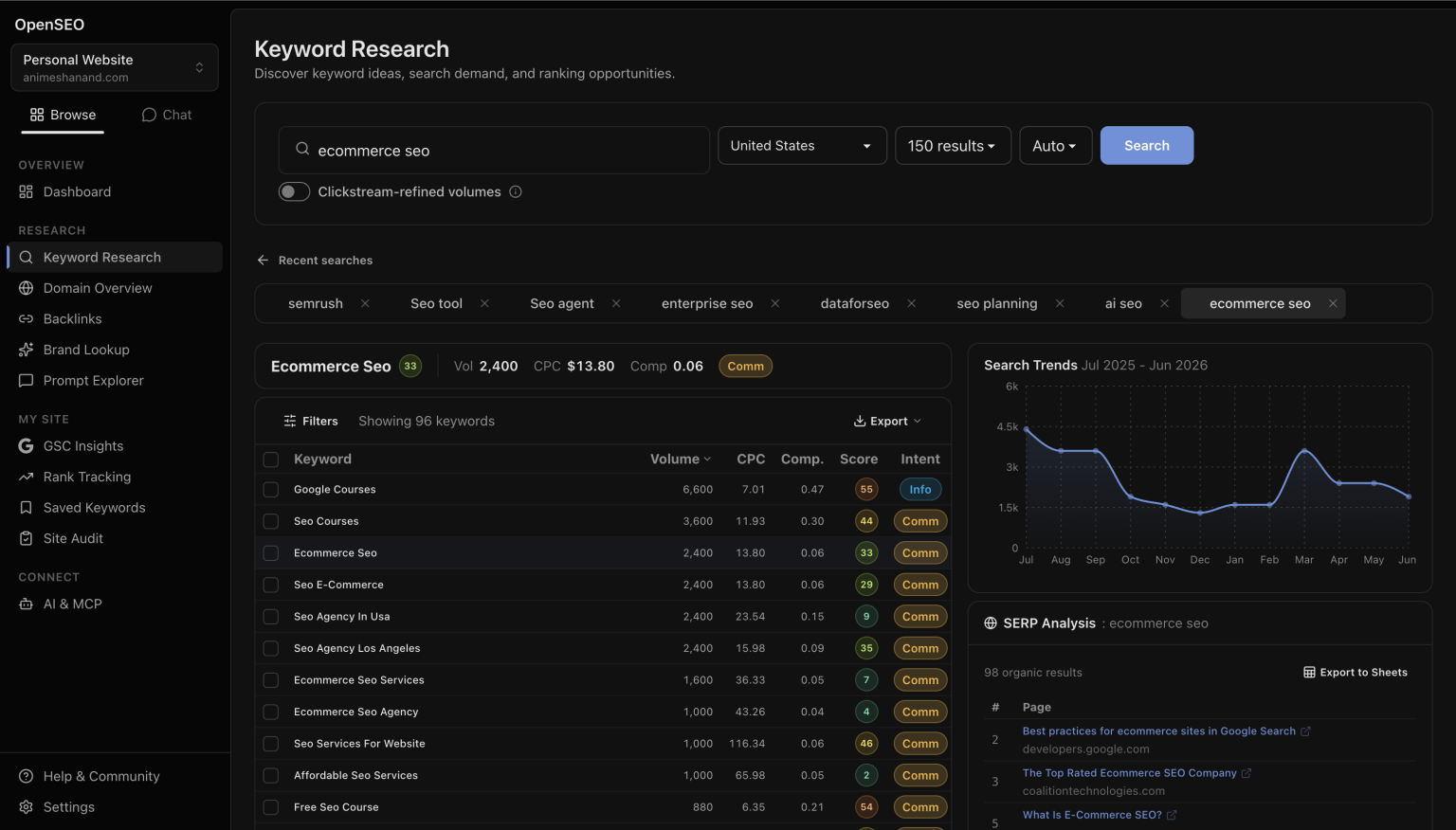
Here’s the contrast that really drives the point home. Doing this same task with raw DataforSEO would mean sending a JSON request, getting back a JSON response, and manually parsing through it to make sense of anything. With OpenSEO, it’s: click, see results, save. That gap, between “raw API call” and “clean dashboard” is basically the entire value proposition of this whole setup.

And here’s the number that really got me: that keyword research you just ran probably cost around $0.05. On Ahrefs, that same lookup is baked into a $129/month subscription you’re paying whether you use it once or a thousand times. You just got the same underlying data for a fraction of a penny.

What Else Can You Do with OpenSEO? (Beyond Keywords)

Keyword research is the obvious starting point, but it’s really just one piece. Here’s what else is in there and why it actually matters.
  • Domain Overview: Drop in any competitor’s domain and get estimated organic traffic, their ranking keywords, and their top-performing pages. This is the quick competitive check that used to require a full Semrush subscription just to run once.
  • Backlink Checker: Look at referring domains, link quality (spam, broken, lost, nofollow), and anchor text distribution, for your site or a competitor’s. One note: this requires DataforSEO’s Backlinks feature enabled on your account, either trial or paid.
  • Rank Tracking: Track your keyword positions over time, set it up once, check back weekly. This is the rank tracker you’d normally shell out $30–50/month for as a standalone tool.
  • Site Audit: Crawls your site and flags technical SEO issues. This one’s actually free, since it runs on Google’s PageSpeed Insights under the hood, no DataforSEO credits consumed at all.
  • AI Visibility & Prompt Explorer (the standout feature): This is what makes OpenSEO feel like a 2026 tool rather than just a Semrush clone with a different logo. It tracks whether your brand gets mentioned or cited inside AI-generated answers such as  ChatGPT, Google AI Overviews etc. and lets you compare how different AI models respond to the exact same prompt. As far as I know, nothing else in the open-source space does this right now.
  • Google Search Console Integration: Connect your GSC account and pull clicks, impressions, CTR, position, and URL inspection data straight into OpenSEO. It’s free, uses zero credits, and takes about 10 minutes to set up your own OAuth connection.
  • MCP Server / AI Agent Integration: You can connect Claude Code, Codex, or other AI agents directly to OpenSEO. The agent can research keywords, dig into SERPs, analyze competitors, and save findings straight back to your workspace. There are also pre-built “Agent Skills”, basically templates that walk an AI agent through common SEO tasks step by step.

The Real Cost Breakdown: OpenSEO vs the Tools You’re Paying For

Numbers make this argument better than opinions do, so here’s the actual comparison:


  Ahrefs Lite Semrush Pro OpenSEO (Hosted) OpenSEO (Self-Hosted)

Monthly cost

~$129

~$139.95

$10 (incl. $10 credits)

$0 (software)

Data cost

Included

Included

Pay-per-use

Pay DataforSEO directly

100 keyword searches

Included

Included

~$5

~$3.50

Your data when you cancel

Gone

Gone

You keep it

You keep it

Open source

No

No

Yes (MIT)

Yes (MIT)

AI agent support (MCP)

Yes

Yes

Yes

Yes

Say you’re a freelancer doing 200 keyword lookups, 50 domain checks, and 10 backlink analyses in a month. That realistically lands you somewhere around $15–25 in DataforSEO usage, less than a fifth of a single month of either major platform.

Self-hosting saves you even more on top of that. The hosted version at openseo.so adds roughly a 28% markup on top of raw DataforSEO costs to cover their infrastructure, so if you’re comfortable running Docker yourself, self-hosting is the cheapest path there is.

And the savings compound in a way flat subscriptions never let you benefit from. With Ahrefs or Semrush, you pay the exact same amount whether you use the tool once that month or a thousand times. With OpenSEO plus DataforSEO, a light month genuinely costs you almost nothing.

Honest caveat, because I don’t want to oversell this: Ahrefs and Semrush still have larger backlink indexes and more polished interfaces overall. If you need enterprise-scale historical backlink data, they may still be the better call. OpenSEO’s sweet spot is founders, freelancers, and small teams who don’t need that scale but do want control and low cost.

Who Should (and Shouldn’t) Use This Setup

This is a great fit if you’re:

  • A solo SEO freelancer sick of stacking subscriptions
  • An indie founder or early-stage startup that needs SEO data but can’t justify $129+/month
  • A small agency without in-house developers who still wants powerful data on demand
  • A technical marketer who likes the idea of actually owning your SEO stack instead of renting it
  • Part of an AI-first team that wants to plug SEO data straight into Claude Code or similar agents

This probably isn’t the right fit if you’re:

  • A large agency needing 50-seat access with role-based permissions (look at the Cloudflare deployment or the hosted version instead)
  • A team that needs the absolute deepest backlink index available (Ahrefs still wins there)
  • Someone who wants a completely zero-setup experience. In that case, the hosted version at openseo.so is a much easier starting point at $10/month, with nothing to install

What’s Next: Making OpenSEO Part of Your Daily Workflow

You’ve got it installed and you’ve run your first keyword search. Here’s how to actually put it to work:

  1. Run a full keyword research session for your main project. Find 20–30 target keywords and save them into your workspace.
  2. Set up rank tracking for your top 10 keywords, then just check back weekly.
  3. Run a site audit on your own website and knock out the top three technical issues it flags.
  4. If you use Claude Code or another AI agent, connect the MCP server and try the keyword research agent skill. Let the agent do a first pass, then review its work inside the OpenSEO UI.
  5. Connect Google Search Console for free performance data sitting right alongside your DataforSEO-powered research.
  6. Check out AI Visibility and see whether (and how) your brand is showing up in ChatGPT or Google AI Overviews.

The broader trend here is worth naming: SEO as an industry is drifting away from $150/month black boxes and toward modular, open, pay-only-for-what-you-use stacks. OpenSEO plus DataforSEO is one of the clearest examples of that shift happening right now. You don’t need to be a developer. You don’t need a big budget. You just need about 20 minutes and a willingness to actually own your SEO data instead of renting it month after month.


Let's talk marketing!

Have a question, a challenge, or just want a second opinion on something?
Let’s connect, I’d genuinely like to hear about it.